01 / UNDERSTAND
What is storyboarding in UX?
Storyboarding represents an experience through a sequence of illustrated moments. It shows a person acting in a particular context, encountering a product or service and reaching an outcome. In UX and service design, it helps a team examine a concept before deciding what to build.
A storyboard can describe an existing situation or propose a future one. Label which kind you are making. A proposed story is a hypothesis about how an experience could unfold, not evidence that people will behave that way.
Why use Storyboarding?
A feature description can hide the work surrounding an interaction. A storyboard makes that work visible: noticing a message, understanding its meaning, finding help and continuing after an interruption. It gives a team concrete moments to question.
Use Customer Journey Map when you need to organise research across an experience. Use a storyboard when you need to examine one particular sequence in context.
When to use it
USE IT WHEN
You need to explain how a concept fits into a real situation.
A proposal crosses screens, physical places or human handoffs.
The team agrees on a feature but imagines different ways people will use it.
When to choose another method
Use User Interviews first if the situation and underlying need are mostly guesses.
Use Paper Prototyping to examine interface choices and task execution.
Use Service Blueprint when the unresolved issue concerns operational responsibilities behind the experience.
What you’ll need
Start with a person, a specific goal and a bounded situation. Bring relevant research notes, known service constraints and the decision the storyboard should support. Paper and a pen are enough. Drawing skill matters less than making actions and context understandable.
Mark invented details as assumptions. When using research, record source references without exposing personal information.
What a storyboard needs
Keep the elements that help answer your question and support a decision.
Who is trying to achieve what? Include only context relevant to the situation.
What starts the experience, and why does the person act now?
Show what the person does, rather than naming a feature.
Show what changes or what another person does in response.
Make time, place and channel changes understandable.
Show the resulting situation and identify what still needs checking.
02 / PUT IT INTO PRACTICE
How to create a UX storyboard
Keep evidence and assumptions distinct. Revisit your work when new information changes your understanding.
01
Choose the decision
Write the question the sequence must help answer. Keep the boundary narrow enough to examine.
For a parcel collection concept: can someone recover when their collection code is unavailable?
02
Set the scene
Specify the person, location, goal and relevant constraints. Separate research from invented context.
Mina reaches a collection counter after work. Her phone has no battery. This scenario is illustrative.
03
Write the key moments
List the trigger, obstacle, response and outcome before drawing. Remove scenes that add no useful information.
Arrival, request for a code, explanation, alternative check, staff response and collection.
04
Draw actions in context
Use simple figures, objects and short captions. Include what the person can actually see or know.
Show the counter notice offering help. Do not assume Mina knows an unpublished recovery process.
05
Challenge the transitions
Ask a colleague to explain the sequence without narration. Identify jumps that require invisible knowledge or effort.
Can staff perform the alternative check, and what prevents someone collecting another person's parcel?
06
Choose the next investigation
Record the most consequential uncertainty and select a method that can examine it.
Review the proposed identity check with operations before prototyping the counter interaction.
Example: collecting a parcel without a working phone
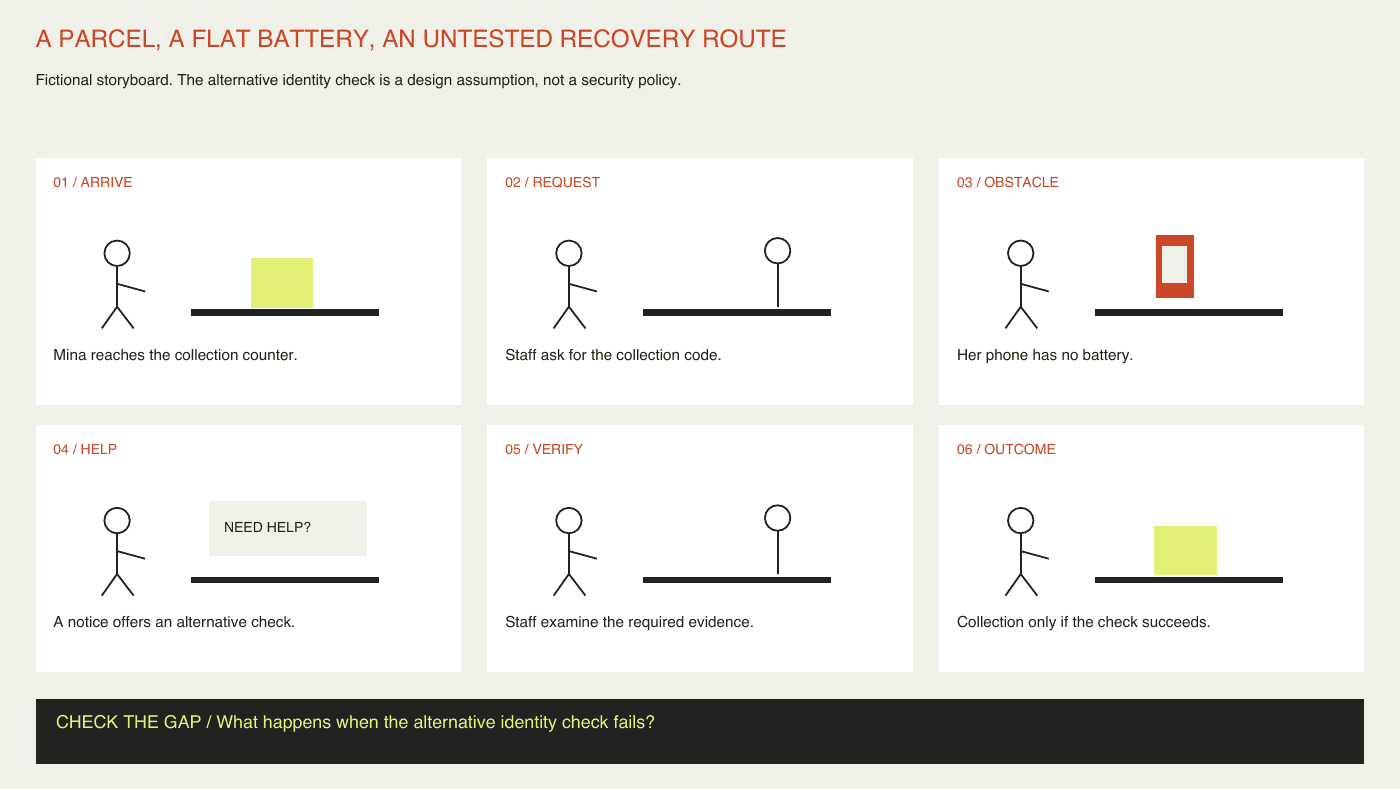
This is a fictional design scenario, not a report of user research. Mina arrives at a collection counter with a phone that has run out of battery. A six frame storyboard explores a proposed recovery route.
She reaches the counter; staff request a collection code; she explains the problem; a visible help notice prompts an alternative check; staff examine the required evidence; she collects the parcel if the check succeeds. The alternative check is a design assumption, not a recommended security policy.
The storyboard reveals a dependency hidden by the phrase ‘offer another way’: the service must define acceptable evidence and staff authority. The team decides to investigate that dependency before polishing the interface. A second version should show what happens when the check fails, including a safe next step.
03 / BELOW THE SURFACE
Below the surface: a coherent story can hide a weak concept
A smooth sequence can make a proposal feel inevitable. The author controls the person, the circumstances and the outcome, so the story may quietly remove the conditions that would make the concept fail.
KNOWLEDGE
What makes the next action possible?
Name the cue, previous experience or assistance required.
AUTHORITY
Who is allowed to make the decision?
Make permissions and service constraints visible.
COUNTEREXAMPLE
What if this transition fails?
Draw a plausible alternative and identify the next investigation.
Review the gaps between frames as carefully as the frames themselves. For each transition, ask what new knowledge, permission or effort makes the next action possible. If none is shown, the story may be relying on an invisible helper.
In the parcel example, moving from ‘phone unavailable’ to ‘identity confirmed’ conceals the most important design question. Draw a second version in which the proposed check fails. Compare the support, privacy and operational consequences rather than choosing the more reassuring ending.
An understandable story is not a validated solution. Feedback on a storyboard can reveal interpretation and concerns; it does not establish whether someone can complete the real task. This review approach is editorial guidance for this article, not a validated assessment framework.
Storyboarding working canvas
Use the first page to draw or describe six moments in reading order. Add the scenario and question at the top. Use the second page to examine evidence, transitions and an alternative ending. The PDF supports typed notes; print it or use a PDF annotation tool for sketches.


Practical tips
Keep captions short enough to leave the action visible.
Show help, waiting and interruptions when they matter to the decision.
Ask reviewers what they infer before explaining the intended story.
Common mistakes
Drawing only screens and leaving out the surrounding situation.
Presenting imagined emotions as research findings.
Polishing the artwork before challenging the concept.
Treating a positive reaction as evidence of successful use.
What you’ll get
A visible scenario, explicit assumptions and a clear next investigation. Keep the unresolved transition attached to the prototype brief so it is not lost when the story becomes a design.