
01 / UNDERSTAND
What is usability testing?
Usability testing examines how people use a product or prototype to attempt realistic tasks. The team observes what happens, where people struggle and what supports completion. The design is being tested, not the participant. This guide focuses on moderated qualitative sessions used to understand problems and guide iteration.
Why use Usability Testing?
A screen can make sense to its creators while hiding a crucial step from someone encountering it for the first time. Observing an attempt gives the team more than a preference: it shows what information and actions were available at the point of difficulty. The evidence can support a design change, while leaving questions about prevalence or performance at scale open.
When to use it
USE IT WHEN
You have a design or prototype that supports a meaningful task.
You need to investigate a suspected interaction problem.
A revision is ready to be checked with relevant participants.
When to choose another method
Use User Interviews for broader accounts of circumstances and needs.
Use a suitable quantitative study if the decision requires a reliable population estimate or benchmark.
Do not test a prototype whose missing behaviour makes the task impossible to interpret.
What you’ll need
Choose research questions, recruit relevant participants and prepare realistic task scenarios. Include access needs and assistive technologies relevant to the service. Arrange consent and secure recording or notes. Pilot the prototype, task wording and session setup. Define success without telling the participant the path, and plan what to do when they cannot continue.
What the method needs
Keep the elements that help answer your question and support a decision.
The design uncertainty the session must address.
A realistic goal without interface instructions.
Experience and access requirements relevant to the task.
Actions, outcomes, hesitation and requests for help.
A possible explanation separated from the record.
A change to investigate and a plan to check it.
02 / PUT IT INTO PRACTICE
How to run a usability test
Keep evidence and assumptions distinct. Revisit your work when new information changes your understanding.
01
Choose a question
Focus the session on a decision the team can act on.
Can a person change an appointment without cancelling it?
02
Write the scenario
Describe the need without using the interface’s labels.
Your work shift has changed and you cannot attend at the booked time.
03
Pilot the setup
Check the task and prototype before inviting the research group.
Ensure alternative appointment slots and confirmation states work.
04
Observe the attempt
Let the participant choose their route and avoid coaching.
Record whether they search for a change option or select cancellation.
05
Probe after the event
Ask what they expected, while preserving what happened unaided.
Explore what they thought cancelling would do to their place.
06
Prioritise and retest
Connect the issue to its consequence and test a revision.
Make change and cancellation distinct, then check a fresh attempt.
Example: moving an appointment
Illustrative session, not research findings. A participant needs a different appointment time. In the fictional prototype they choose “Cancel”, expecting to select a new slot next. A warning makes them stop because they fear losing the booking.
The observation is the route and hesitation. A possible interpretation is that the change option is not discoverable. The team also checks whether the task wording or prototype omitted another route. A revised design presents change and cancellation separately. It still needs another test; a clearer label is a proposal, not a demonstrated improvement.

03 / BELOW THE SURFACE
Below the surface: help changes what the result means
Once a moderator points out a control, later completion does not show that the original route was discoverable. Record unaided and assisted progress separately. Intervention may still be appropriate to protect the participant’s time or investigate another part of the task.
01 / EVIDENCE
What is supported?
Which source or observation supports the current interpretation?
02 / LIMIT
What remains uncertain?
Which assumption would change the decision if it were wrong?
03 / ACTION
What happens next?
Who will investigate or test the next step, and when?
State when help occurred, what was said and which later observations remain useful. Avoid turning a session into a binary pass or fail if that erases the difficulty. Conversely, a participant’s positive reaction does not cancel an observed obstacle. Interpret the task, prototype limitations and assistance together before recommending a change.
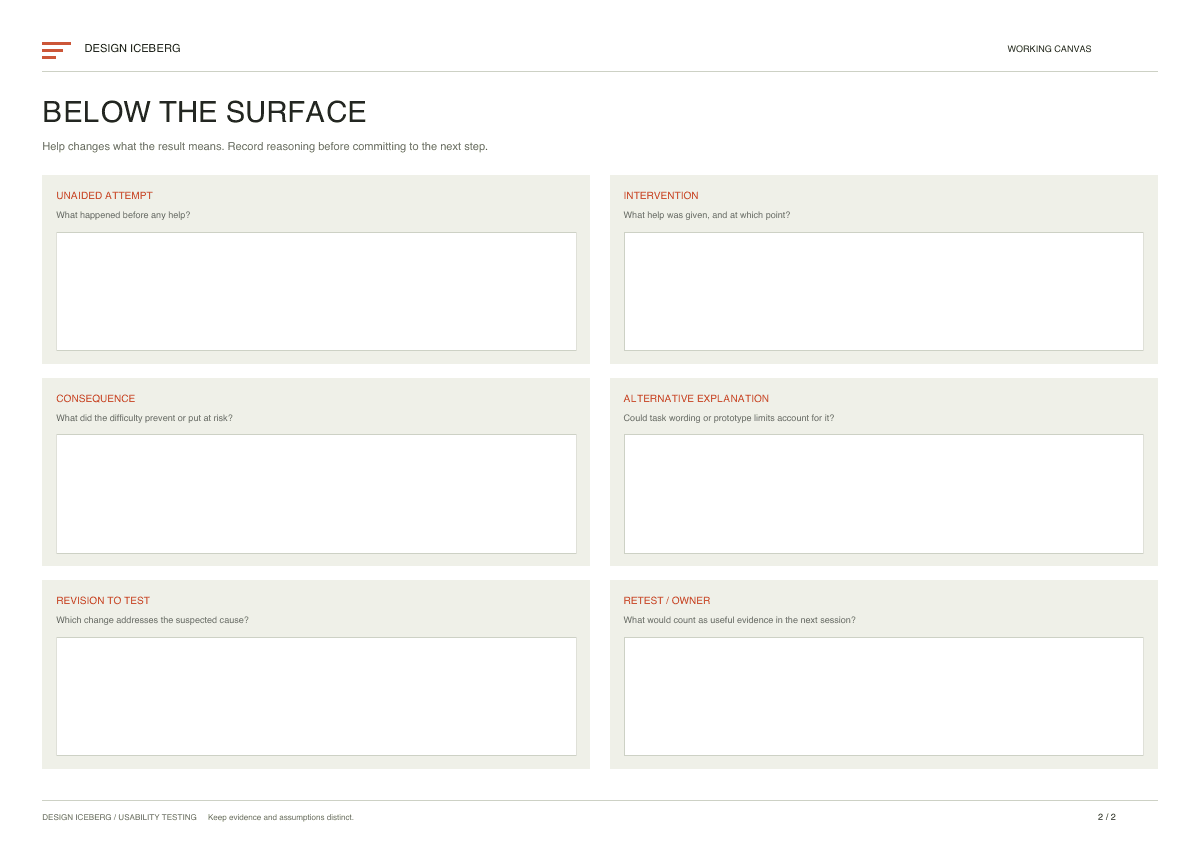
Usability Testing template
Use the first page for the practical work and the second to challenge the reasoning before choosing a next step. The canvas follows this guide and keeps evidence, assumptions and decisions visible.
The two page PDF contains 12 editable fields. Open it in a PDF reader that supports forms and save a working copy.

Practical tips
Use neutral prompts and avoid explaining the interface.
Record the consequence of a problem, not just its occurrence.
Keep prototype limitations visible in the analysis.
Common mistakes
Teaching the task and then reporting successful completion.
Using leading task wording that names the correct control.
Reporting small qualitative counts as population success rates.
What you’ll get
Observed difficulties and a revision to investigate. Keep the supporting evidence and unresolved questions with the output. Assign an owner to the next action and revisit the result when the underlying situation changes. The method supports judgement; the completed canvas is not proof that the proposed choice will work.