01 / UNDERSTAND
What is a content audit?
A content audit evaluates existing content against a defined purpose and set of criteria. An inventory records what exists; an audit adds a judgement about what should happen to it and why.
The scope might be a whole website, one service journey or a set of documents. Useful criteria can include user need, accuracy, accessibility, duplication, performance and ownership. Choose them for the decision rather than scoring everything by default.
Why use Content Audit?
Content problems are often distributed across pages that look reasonable individually. An audit can reveal conflicting instructions, repeated explanations and material nobody is responsible for maintaining. It gives redesign work a reasoned starting point instead of moving every old page into a new layout.
When to use it
USE IT WHEN
A migration or redesign needs decisions about existing material.
People encounter outdated or contradictory instructions.
The team needs a manageable content maintenance backlog.
When to choose another method
Use User Interviews when the audience’s needs are not understood.
Use Card Sorting or Tree Testing to investigate organisation and findability.
Use Usability Testing to examine whether content supports a particular task in context.
What you’ll need
Define the URLs, documents, languages and channels included. Gather available analytics, search queries, support evidence and subject expertise. Agree the review criteria and decision labels. Include a content owner who can verify facts, and record unknowns rather than converting missing data into a low score.
What the method needs
Keep the elements that help answer your question and support a decision.
A stable identifier, location, title and format for each item.
The task or question the content should support.
Evidence against the agreed quality and performance criteria.
Keep, revise, merge, retire or investigate, with a reason.
Links, policy requirements or other content affected by the change.
Who acts, who approves and when the content is reviewed again.
02 / PUT IT INTO PRACTICE
How to conduct a content audit
Keep evidence and assumptions distinct. Revisit your work when new information changes your understanding.
01
Define the audit boundary
Choose the decision and content set. State exclusions so the result is not mistaken for a complete review.
An application journey may include emails and PDFs as well as web pages.
02
Build the inventory
Collect locations and identifiers, then check for overlooked formats or versions.
A download linked from several pages should remain traceable as one asset.
03
Calibrate the criteria
Review a small sample together and resolve different interpretations.
Agree what outdated means for a rule that changes annually.
04
Assess with evidence
Record findings, sources and uncertainty beside each item.
Low traffic alone does not establish that a page is unnecessary.
05
Choose actions and dependencies
Make a reasoned decision and note redirects, approvals or linked material that must change with it.
Merging instructions also requires checking links to the old versions.
06
Prioritise and assign
Sequence work by consequence and dependencies, then give each action an owner.
Correct a harmful instruction before polishing a frequently visited introduction.
Example: three versions of an application guide
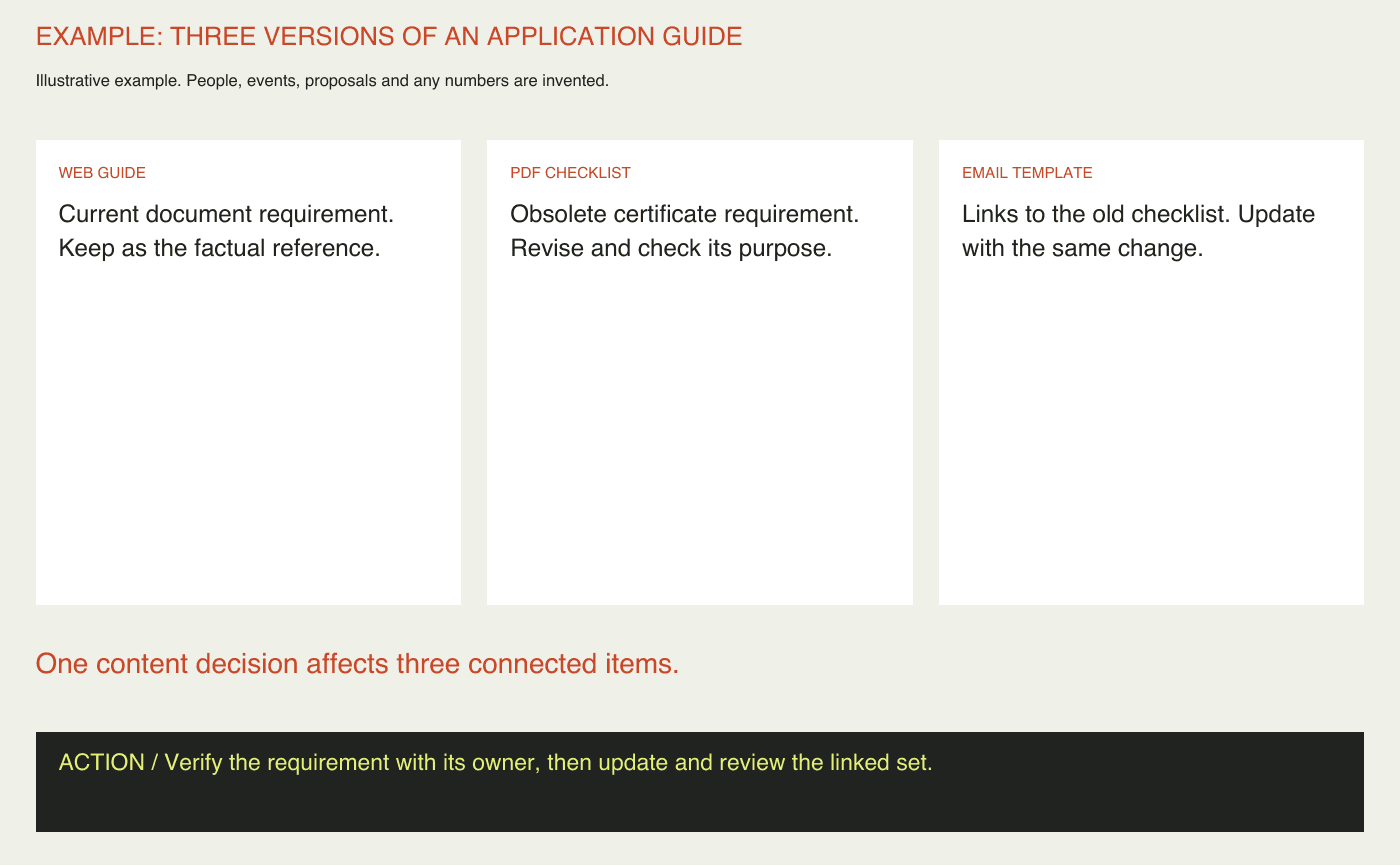
Fictional audit: a training provider has a web guide, a downloadable checklist and an email template explaining how to apply. The web page gives the current document requirement, while the checklist asks for an obsolete certificate. The email links directly to that checklist.
The proposed decision is to revise the checklist and email together, then consider whether a separate download remains useful. Deleting the PDF immediately could break a preparation workflow without solving the inconsistent instruction.
The audit record names the factual owner, the linked items and the next review date. The example illustrates a decision chain; it does not report an actual provider’s content quality or traffic.
03 / BELOW THE SURFACE
Below the surface: low use is not low consequence
Frequency and importance answer different questions.
NEED
What decision does this content support?
Name the situation, not just the audience.
CONSEQUENCE
What happens if the answer is wrong?
Review impact separately from traffic.
DEPENDENCY
What else must change with it?
Trace links, versions and responsibilities.
A rarely visited cancellation or accessibility page can matter greatly when someone needs it. Ranking content solely by page views can privilege easy traffic gains over consequential failures. Assess the cost of a wrong or missing answer alongside usage.
For the application checklist, a small audience may still face substantial wasted effort. Record what decision the content supports, what happens if it misleads and whether another dependable route exists.
This editorial check does not turn consequence into an invented numerical score. Use explicit reasoning and have the relevant owner challenge it. Where a retention or policy obligation is uncertain, investigate before retiring the item. An audit recommendation is not itself permission to delete.
Content Audit companion worksheet
Page one is a compact inventory with assessment and action columns. Page two develops one consequential content decision, including dependencies, ownership and review. Use a spreadsheet for larger inventories; the worksheet supports the judgement behind each row.


Practical tips
Calibrate criteria on a small sample before the full audit.
Keep unknown evidence distinct from a negative finding.
Common mistakes
Calling a URL list an audit.
Removing content solely because traffic is low.
Assigning actions without an owner or linked content checks.
What you’ll get
An actionable content backlog with reasons, dependencies and owners. Verify implemented changes against the same user needs rather than treating completion of the spreadsheet as the outcome.